
You can view a record of API calls made within the last 24 hours that have bypassed Guard Dog Proxy for Jira via the Audit Logs tab. Here’s how to do this:
Configuring audit logs settings
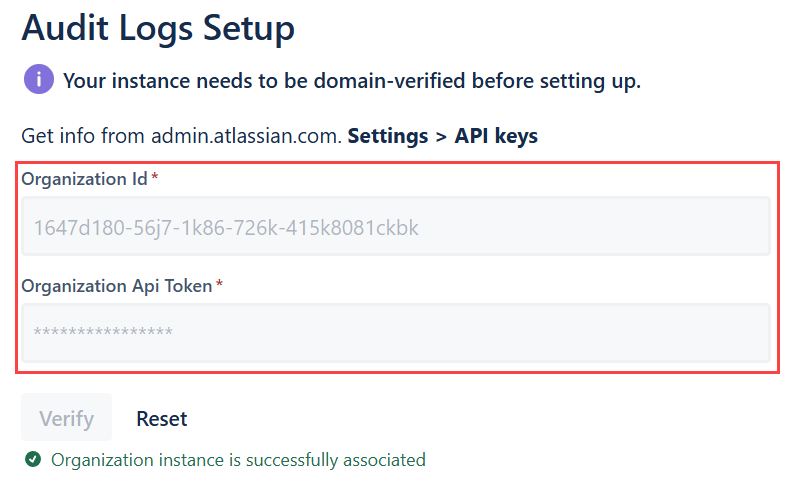
You must verify the domain of your instance before setting up. Read this Atlassian guide to learn how.
-
Navigate to the Jira top menu and click Settings (⚙️) > Apps > Guard Dog Proxy for Jira.
-
On the left menu, click Settings.
-
Key in the Organization ID and the Organization API token in the respective fields. Click Verify.
Viewing audit logs
-
Click on the Audit Logs on the left menu.
-
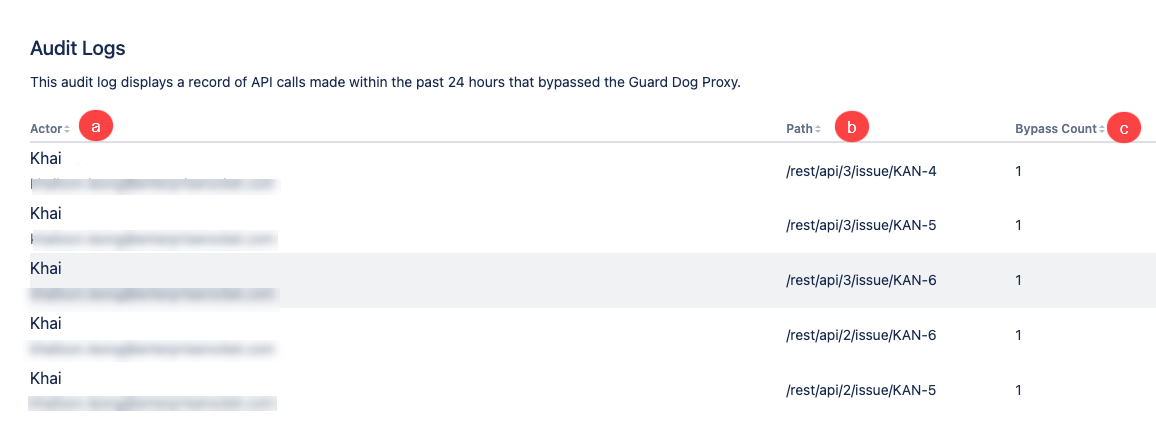
You should see this table:
-
Actor: Details of the actor that has made the API call, which includes email address.
-
Path: The access path used.
-
Bypass count: Number of times an attacker bypasses authentication mechanisms.
-